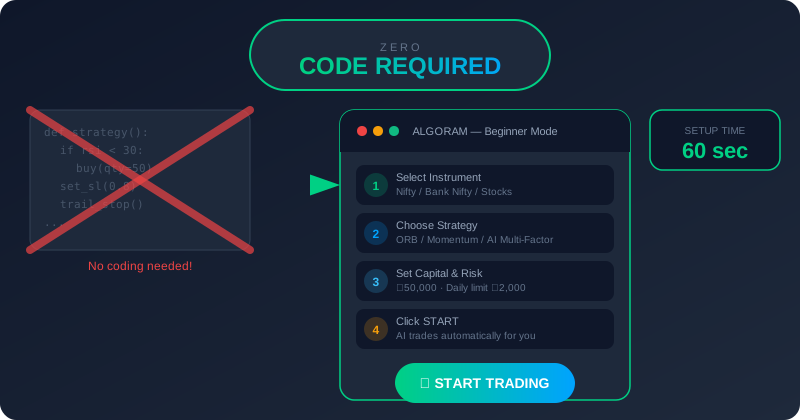
Five years ago, if you wanted to do algo trading, you needed to know Python. You needed to understand APIs, data feeds, order management systems, and backtesting frameworks. You needed to either be — or hire — a software developer.
2026 is a completely different story.
Today, a 22-year-old fresh graduate from Rajkot who has never written a line of code in her life can set up a fully automated NIFTY options trading strategy in under 60 seconds — and walk away from her phone while it trades on her behalf.
This guide is for everyone who ever thought "algo trading sounds great, but I'm not technical enough." Because that barrier? It's gone.
What is No-Code Algo Trading?
No-code algo trading means using a platform that handles all the technical complexity — the programming, the data feeds, the order routing — for you. Instead of writing code, you make choices through a simple interface:
- Which market do you want to trade? (NIFTY, BANKNIFTY, Stocks)
- Which pre-built strategy do you want to use?
- How much capital do you want to allocate?
- What's your maximum loss for the day?
That's it. The algorithm — already written, already tested across years of market data — does everything else. It watches the market, identifies entries, places orders, manages your stop-loss, and exits when conditions are met.
No-code algo trading = algorithmic trading where you make decisions through buttons and dropdowns, not by writing programs. The trading intelligence is already built in. You just configure it to match your preferences and goals.
Think of it like using a smartphone. You don't need to understand how a processor works or how the antenna transmits signals. You just open WhatsApp and send a message. No-code algo trading is the same idea applied to financial markets.
Why Coding is No Longer Necessary
The old model of algo trading required programming because the tools were built by engineers for engineers. The assumption was that anyone who wanted to automate trading would also understand how to interface with broker APIs, parse market data streams, and handle error cases in code.
That assumption was always wrong — and platforms like ALGORAM were built specifically to fix it.
Here's the thing: the strategies themselves don't require you to understand code. The logic behind "buy NIFTY CE when RSI crosses 60 with volume confirmation and exit at 2% profit or 1% loss" is something any trader understands. The technical part — translating that logic into instructions a computer can execute — is what ALGORAM has already done for you.
"The question was never 'can a non-coder understand trading strategies?' Of course they can. The question was always 'can we build tools good enough to not need them to code?' In 2026, the answer is unambiguously yes."
— Rahul Patel, Co-Founder, ALGORAMWhat's changed is execution quality. Early no-code tools were clunky, slow, and unreliable. Today, ALGORAM's execution engine fires orders in under 50 milliseconds — the same speed as institutional systems — while the user interface remains simple enough for a first-time trader to navigate on day one.
Benefits of Ready-Made Automation for Beginners
For someone just starting out, the advantages of using a pre-built automated system go far beyond convenience:
You Start With Proven Strategies
ALGORAM's pre-built strategies are backtested across 20 years of NSE/BSE data. As a beginner, you're not experimenting with untested ideas — you're deploying systems with a documented history of performance across multiple market cycles.
This is a massive advantage. Most retail traders spend years developing and testing strategies manually, losing money along the way. With ALGORAM, you start with strategies that have already gone through that process.
Emotions Never Enter the Equation
For beginners especially, emotional trading is devastating. Every new trader knows the feeling: your first few manual trades go against you, you panic, you break your own rules, and suddenly a ₹3,000 planned loss becomes a ₹12,000 emotional disaster.
When an algorithm runs your trades, this simply cannot happen. The rules are set. They execute. Every time. Without exception.
You Learn While the System Trades
Using an automated system doesn't mean you stop learning — it means you learn faster. With ALGORAM running your strategy, you can study the market with clarity instead of anxiety. You observe what signals trigger entries, how exits unfold, what market conditions affect performance. The best trading education is watching a disciplined system operate in real markets.
ALGORAM's Beginner Features — Explained Simply
ALGORAM was designed from the ground up with one specific type of user in mind: an Indian retail trader who wants to automate their trading but has no interest in becoming a software engineer. Every feature below was built to serve that person.
From signup to your first live automated strategy. Connect broker, pick strategy, set capital — done.
A simplified interface that shows only what you need. No confusing settings, no overwhelming options.
Ready-to-run strategies for NIFTY, BANKNIFTY, and Stocks. Tested, proven, one click to activate.
Trade on real market data with virtual money. See real results — zero financial risk.
Full access on any device. Monitor trades, view P&L, and manage strategies from your phone.
Start your entire automated strategy with one tap. Stop it the same way. No complicated process.
A Closer Look: Beginner Mode
When you log into ALGORAM for the first time, you're greeted with Beginner Mode — and it's exactly what it sounds like. The interface strips away every setting that isn't essential for getting started.
You see four things:
- Strategy selector — choose from a curated list of pre-built strategies with simple descriptions ("NIFTY Intraday Options", "BANKNIFTY Scalper", "Stocks Momentum").
- Capital input — how much money should the strategy trade with today?
- Daily loss limit — what's the most you're willing to lose today? The system stops automatically if this is reached.
- Start button — one tap. That's it.
No RSI parameters to configure. No moving average periods to set. No complex multi-leg option structures to understand. The strategy handles all of that internally. Your job is to tell it: which strategy, how much, and what's the safety limit.
In our user testing, the average time from new account creation to first automated strategy running is 47 seconds. Broker connection (30 seconds) + strategy selection (10 seconds) + Start button (1 click). That's it. Less time than it takes to make a cup of chai.
Mobile App — Trade From Anywhere
ALGORAM's mobile app gives you full access to your automated strategies from your phone. You can check your real-time P&L on the way to work, review yesterday's trades over lunch, or pause a strategy during an unexpected market event — all without sitting at a computer.
And because the system trades autonomously, you're not using the app to place trades. You're using it to stay informed. The trades happen automatically, whether your phone is in your pocket or on the table.
Demo Mode — Learn Without Any Risk
This is the feature we tell every new user to start with — no exceptions.
Demo Mode connects your ALGORAM account to the live market data feed, runs your chosen strategy on that real data, and executes every trade — entry, exit, stop-loss, trailing stop — as if it were a live trade. But instead of using your actual money, it uses a virtual account.
The result is the closest possible simulation of real trading. You see exactly how the strategy performs in actual market conditions. You experience the rhythm of automated trading — the entries, the exits, the waiting periods, the notifications — without any financial exposure.
After running your strategy in Demo Mode for a week, you'll know exactly how it behaves. You'll have seen it enter trades, manage stop-losses, exit at targets. You'll understand what a normal trading day looks like for that strategy. And you'll go live with confidence built on actual evidence — not hope.
Studies show that traders who paper-trade for at least 2 weeks before going live have significantly better outcomes in their first three months of real trading. Demo Mode isn't a step you skip to get to the "real" thing faster — it is the real thing, minus the downside. Use it fully.
5 Common Beginner Mistakes — And How to Avoid Them
Even with a platform as simple as ALGORAM, new traders make predictable mistakes. Here are the five most common — and how to sidestep each one:
Skipping Demo Mode and going live immediately
The excitement of starting is real. But going live before you've seen how the strategy behaves in real market conditions is like driving on a highway the first time you sit in a car. Use Demo Mode for at least 5–7 trading days before risking real money.
Allocating too much capital on day one
Start with a small allocation — 10–20% of what you eventually plan to trade with. Give yourself time to see the strategy work, understand its rhythm, and build confidence. You can always scale up; you can't undo a large early loss.
Stopping the strategy after the first losing day
Every strategy has losing days. That's normal — even with a 70% win rate, 3 out of 10 trades lose. Stopping after the first bad day means you never give the strategy enough time to show its actual edge. Judge performance over weeks, not days.
Not setting a Daily Loss Limit
ALGORAM lets you set a daily loss limit that auto-stops trading. New users sometimes skip this, thinking "I'll monitor it manually." Don't. Set the limit. It protects you from the scenarios you haven't anticipated yet.
Manually overriding the system
When you see a trade in progress and get the urge to exit early or add to the position — resist it. The strategy was designed to follow specific rules for a reason. Every manual override undermines the very advantage automation gives you.
Your Step-by-Step Guide to Starting Today
Here's exactly how to go from zero to your first automated strategy — today, without any technical knowledge:
Sign Up for ALGORAM
Visit algoram.in/demo and fill in your name, phone, and email. Free for 7 days — no credit card. Your account is ready within 24 hours.
Connect Your Broker
Link Zerodha, Upstox, 5paisa, Angel One, or any supported broker. Takes about 30 seconds using their official API key. Your funds stay in your broker account — ALGORAM only gets permission to place trades.
Switch on Beginner Mode
From your dashboard, enable Beginner Mode. This simplifies the interface to just the four essentials: strategy, capital, daily loss limit, and start.
Activate Demo Mode
Before going live, turn on Demo Mode. This runs your chosen strategy on real market data with virtual money. Run it for at least 5 trading days to see how it performs.
Choose Your Strategy
Pick from the pre-built list. For complete beginners, we recommend starting with the NIFTY Options Basic strategy — simple rules, clear signals, conservative risk management.
Set Capital & Daily Loss Limit
Enter how much capital to trade with (start conservatively — ₹25,000–₹50,000 for your first week) and set your daily loss limit (3% of capital is a good starting point).
Press Start — and Step Away
One tap. ALGORAM is now running your strategy. You'll receive notifications for every trade. Check your P&L at the end of the day. Review, learn, and go again tomorrow.
🚀 Start Your First Automated Strategy Today
No code. No complexity. No screen time. ALGORAM's Beginner Mode and Demo Mode make automated trading accessible for every Indian retail trader — starting in under 60 seconds.
7-day free demo · No credit card · Setup in under 1 minute
Frequently Asked Questions
The Bottom Line
The "you need to know coding to do algo trading" era is over. The tools available in 2026 — and specifically ALGORAM's beginner-first design — have removed that barrier completely.
What remains is the part that was always the real challenge: finding a strategy that works, managing your risk, and staying consistent. ALGORAM handles the first. The daily loss limit and capital protection handle the second. And the fact that it's all automated handles the third.
You don't need to become a programmer. You don't need to stare at charts for six hours. You don't need to take a three-month trading course before you start.
Start your first automated strategy with ALGORAM today. Run it in Demo Mode for a week. See what disciplined, emotion-free, fully automated trading actually looks like — before risking a single rupee.

Rahul is the product visionary behind ALGORAM's beginner-friendly design. His core belief is that institutional-grade automated trading should be accessible to every Indian retail trader — regardless of technical background. He designed ALGORAM's Beginner Mode and Demo Mode specifically to remove the entry barriers that prevented most traders from accessing algo trading tools.